
Adding Observations After a Session
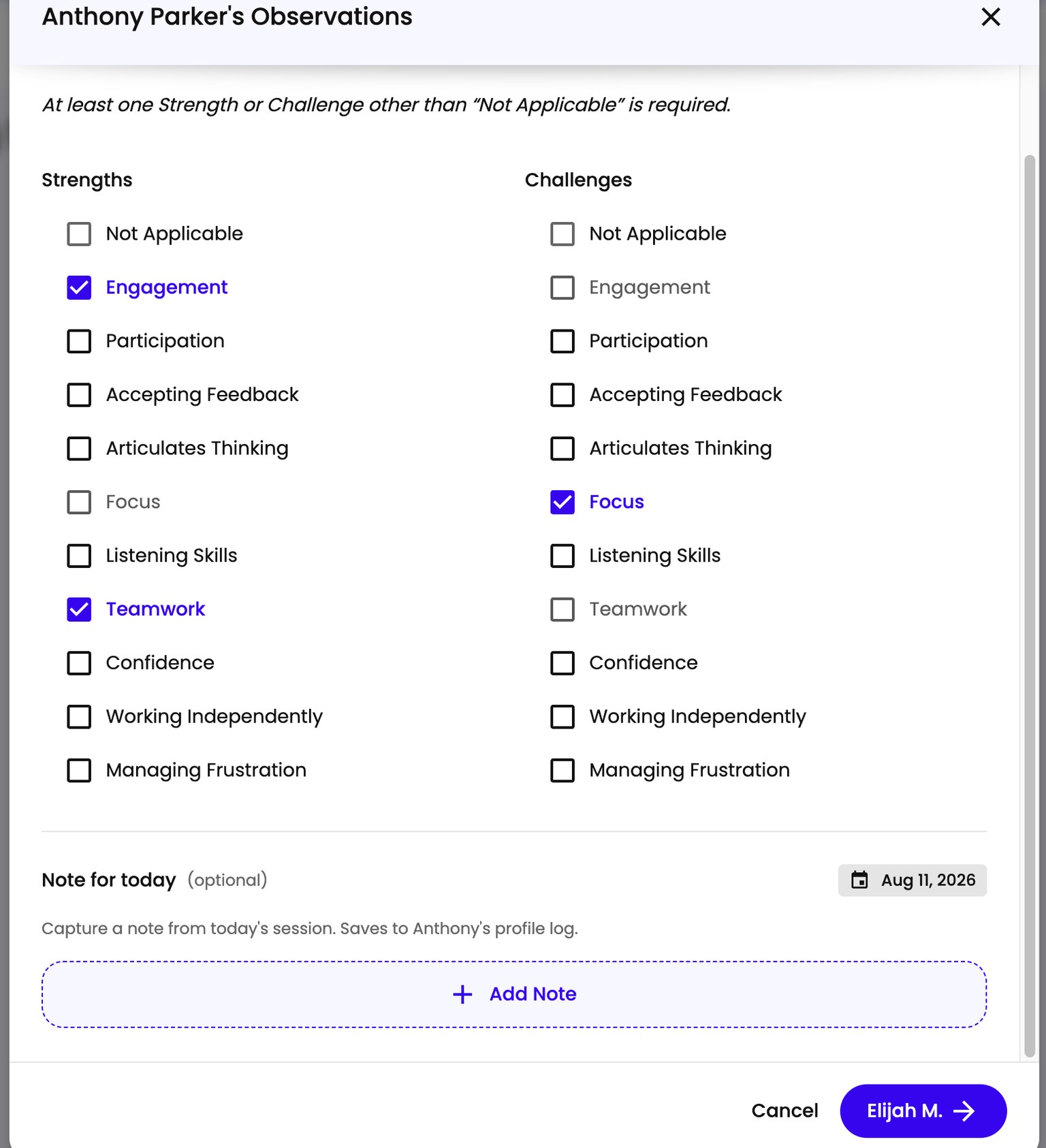
After a session ends, the platform prompts you to record observations for each student. Observations cover the full week, not just the session you just finished - you can update them after any session until the week closes on Saturday. At least one Strength or Challenge other than Not Applicable is required before you can move on.
Opening Observations
You have two ways to get to the observations form:
- Right after ending a session. When a session ends, you land on a summary screen. Click Note Observations to open the form.
- From your schedule. Find the session on your schedule. On the right side of a completed session that’s missing observations, click the Complete Now link next to “Observations.”
The Observations prompt only appears while observations are still missing. Once you’ve recorded them, it drops off the session entirely, so an absence of the prompt means you’re done for that session.
Filling In Observations
The form opens to the first student in your group. At the top you’ll see their name and the week the observations apply to.
Strengths and Challenges each offer the same ten options: Engagement, Participation, Accepting Feedback, Articulates Thinking, Focus, Listening Skills, Teamwork, Confidence, Working Independently, and Managing Frustration. You can pick more than one in each column, and picking something as a Strength rules it out as a Challenge.
Each column also has a separate Not Applicable checkbox for when nothing on the list fits that student. You can mark one column Not Applicable, but not both - checking it in one column turns it off in the other. So if a student’s week was all strengths, mark Challenges as Not Applicable and check the strengths you saw.
There’s also an optional Notes field where you can capture anything else worth remembering about that student. Notes save to the student’s profile log.
Moving Through Your Group
Once you’ve filled in observations for the first student, click the button at the bottom right showing the next student’s name to move on. It saves that student and brings up the next one. Work through the group the same way. On the last student the button reads Save & Close instead, and clicking it saves and closes the form.
Since observations are weekly, you can come back after any session that week and adjust what you recorded - nothing locks until the week closes on Saturday.